Run high-performance PaperMC, Purpur, Fabric, NeoForge, and Vanilla Minecraft servers directly on your Android phone or tablet with zero root permissions required.
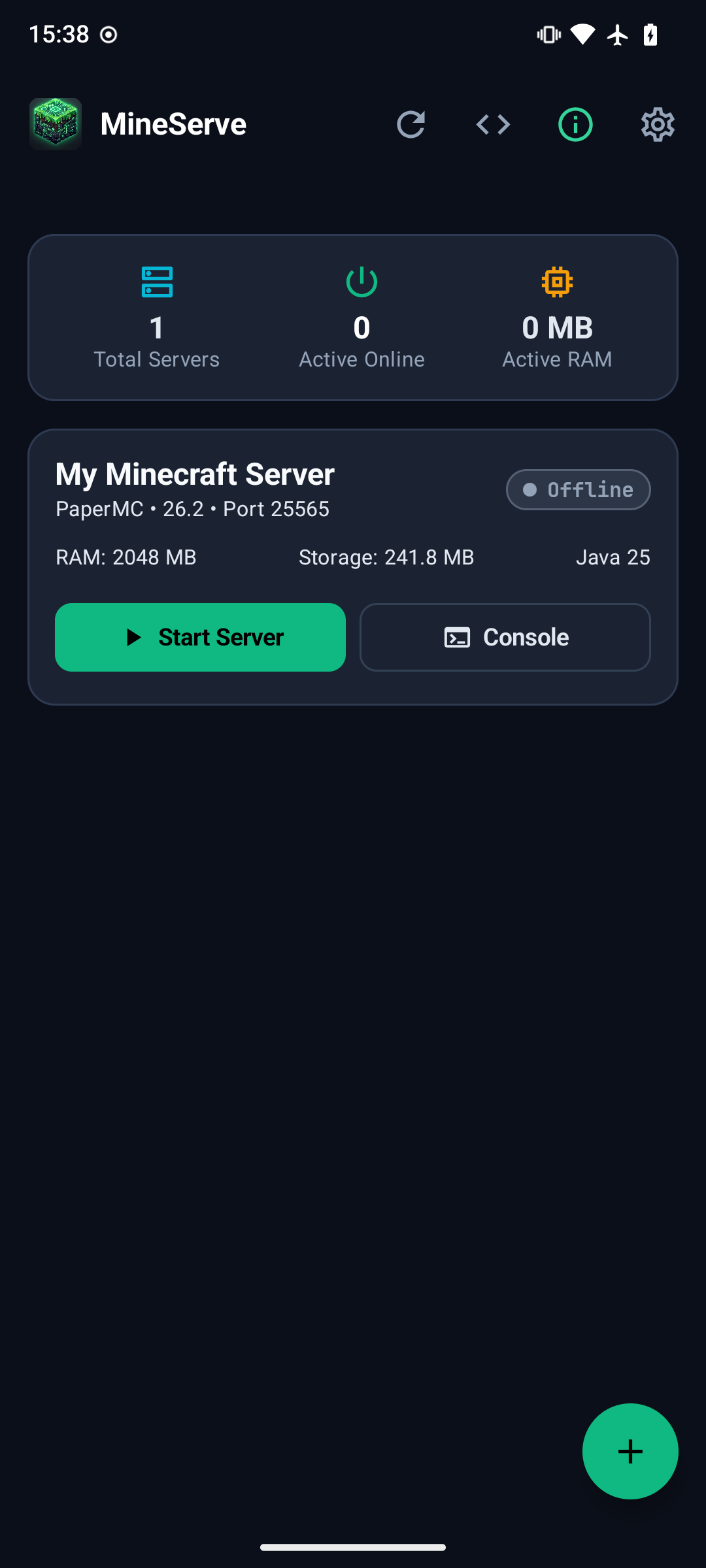
Take a tour of the native Jetpack Compose interface running directly on Android hardware.
Instantly view active servers, allocated RAM, resident memory consumption via /proc, live player counts, and LAN connection status. Start, stop, or open terminal sessions with a single tap.
MineServe bundles an entire Linux container stack, isolated Java JDKs, and terminal subsystems into one clean app.
Executes entirely in Android user space using native PRoot ptrace system call interception. No Magisk, root privileges, or bootloader unlocking required.
One-tap automated installation of OpenJDK 8, 17, 21, and 25 runtimes inside the container to run any Minecraft version from legacy 1.12 to 1.21+.
Native JNI pseudo-terminal (PTY) with ANSI colors, customizable macro hotbar chips, slash command auto-completion, command history recall, and draggable selection.
Host multiplayer over cellular or restrictive Wi-Fi with built-in bore.pub instant free tunnels and Playit.gg persistent subdomains, plus dynamic QR code sharing.
Preserve phone battery with idle auto-shutdown when zero players are online, and automatically spin up the server when players ping or join from their in-game server list.
Flexible background task automation for periodic world backups, full archives, nightly server restarts, and in-game announcements with full 5-field cron support.
View real-time 2D world maps directly in-app with built-in Squaremap integration, full Overworld/Nether/The End world rendering tools, and live player tracking.
Import singleplayer .zip or .mcworld saves, reset Nether/End dimensions in 1 tap, and reclaim
storage with pure Kotlin Anvil chunk pruning.
Search, browse project descriptions, and 1-tap install mods or Bukkit/Paper plugins directly from Modrinth,
with support for uploading custom .jar files.
Full server file manager with search and file operations, syntax-highlighted editor with line numbers, and an automated crash log analyzer with 1-tap quick fixes.
Fast zip backups of world saves or entire server directories with instant 1-tap rollback restoration and direct export to Android storage and share sheets.
Dedicated Android Foreground Service with CPU WakeLock protection keeps your Minecraft world alive when switching apps or locking your screen.
Choose from optimized forks, regionized multithreading, modular modding toolchains, or official vanilla builds.
High-performance Minecraft server fork designed for speed, security, and extensive Bukkit/Spigot/Paper plugin support.
Drop-in replacement for Paper with extensive gameplay customization, configurable mob mechanics, and performance optimizations.
Java Paper server pre-configured with Geyser and Floodgate to allow iOS, Android, and console Bedrock players to join seamlessly.
Lightweight, modular modding framework and server platform for modern Minecraft versions, snapshots, and performance mods (Lithium, FerriteCore).
Modern community-driven modding API and server platform for complex modpacks and custom gameplay mechanics.
Official standalone dedicated server software directly from Mojang Studios for standard unmodded survival and creative worlds.
How MineServe runs a desktop-grade Linux container and Java virtual machine entirely in Android user space.
Modern Material 3 interface controlling server state, telemetry charts, Modrinth queries, and visual config properties.
Guarantees persistent CPU scheduling, manages notifications with live player stats, and prevents Android Doze from killing processes.
Direct POSIX openpty bridge providing two-way standard input/output streaming, ANSI color rendering, and VT100 console emulation.
Ptrace syscall interception provides a rootless chroot container with isolated /servers,
/tmp, and unprivileged user namespace.
Spawns Java 8, 17, 21, or 25 with configured RAM allocations (e.g. -Xms1024M -Xmx2048M) and
Aikar's garbage collection flags.
Everything you need to know about setting up and playing on MineServe.
No root access is required whatsoever. MineServe uses PRoot (ptrace-based virtualization) to create a user-space Linux environment inside the app's private sandbox. It runs safely on stock Android devices without modifying system partitions.
Over Local Wi-Fi: Anyone connected to the same Wi-Fi network can join by entering your phone's local IP address and port (displayed in the app) in their Minecraft Multiplayer screen.
Over Mobile Hotspot: Enable your phone's personal hotspot and have other players connect their Wi-Fi to your hotspot to play anywhere on the go.
Over the Internet: Built-in zero-port-forwarding tunneling allows you to share servers over cellular data or Wi-Fi without router setup. Choose from instant free tunnels with bore.pub or persistent subdomains with Playit.gg, complete with 1-tap QR code sharing and Bedrock deep links.
Yes! When creating a server in the wizard, select "Paper + Geyser (Cross-Play)". This automatically sets up GeyserMC and Floodgate translation proxies so Bedrock players can join the Java server seamlessly.
For standard vanilla or Paper play with 2-5 players, 2048 MB (2 GB) is recommended. For heavier modpacks (Fabric/NeoForge) or high chunk view distances, 3 GB to 4 GB is ideal. MineServe allows you to adjust RAM allocation using both a slider and manual numeric input.
MineServe supports Android 6.0 (API 23) and higher. It includes optimized native PRoot binaries for ARM64 (aarch64), x86_64, and ARMv7 (armeabi-v7a) architectures.
MineServe runs inside a persistent Android Foreground Service backed by a CPU
WakeLock. As long as notification permissions are granted, Android will not kill your active
server when multitasking or locking your screen.
Connect with other server creators, share custom configs, get troubleshooting help, and test early beta builds.